Somebody in your Skool group posts a win. Three people reply, “How do I get in on this?”
Your member drops your link. Two of them join. You made money. Your member made nothing.
That’s a missed chance, and it’s a setting you can flip in about a minute.
The Skool affiliate program actually comes in two flavors: one that pays you for sending creators to Skool, and one that pays your members for sending people to you. Most owners only know about the first one.
Some links in this article are affiliate links. If you buy through them, we may earn a commission at no extra cost to you.


This one’s for you if you run a paid Skool community, or you’re about to, and you want growth that doesn’t depend on Skool’s algorithm or a big ad budget. I went through Skool’s help center, the FTC’s disclosure guidance, the IRS rules and the research on referred customers. Here’s how I’d set it up.
Here’s the line to remember: Your members are your best marketing team. Pay them like it.

Here’s what’s going on with the Skool affiliate program
Quick map. If you’re brand new, start with my breakdown of what a Skool paid community costs and how to grow one. If you’re still picking a platform, here are Skool alternatives with fees side by side. This piece is about one thing: referrals.
Program one: refer creators to Skool and earn 40%
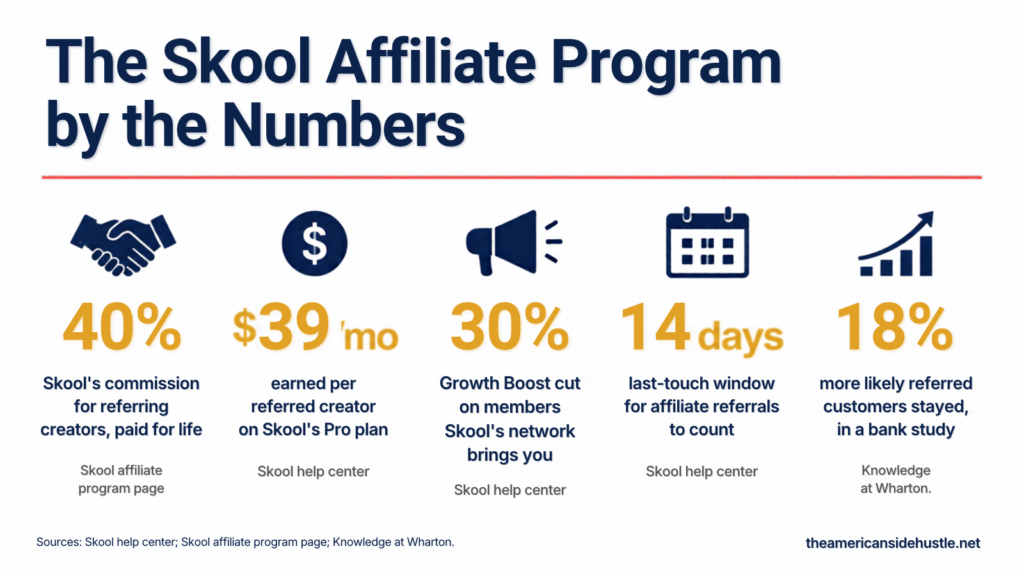
This is the program you’ve probably seen people hype on YouTube. Skool’s affiliate program page says it plainly: “Refer people to Skool and earn 40% of monthly recurring revenue for life.”
The dollar amounts are in Skool’s help article on referring others. If someone you refer picks the Pro plan, “you’ll receive $39 per month in commissions.” If they go with Hobby, it’s $3.60 a month. That lines up with Skool’s pricing page, which lists Hobby at $9 a month with a 10% transaction fee and Pro at $99 a month with a 2.9% fee.
There’s a quiet bonus, too. According to the program page, “If somebody creates a group from your group, we attribute it to you automatically.” So if a member of your community decides to start their own, you get credit without them ever clicking your link. Skool’s pitch: “This makes Skool an income stream, not a cost.”
The rules matter more than the pitch, though. Per the help article, Skool uses “a 14-day last-touch attribution method.” Commissions sit as pending for 14 days in case of refunds. Self-referrals are prohibited. If the group you referred changes owners or gets archived, your commissions stop. And this one is easy to miss: “Running ads to the Skool keyword is prohibited.”
Program two: let your members earn for referring you
This is the one most owners skip. Skool calls it member affiliates, and its setup guide says it’s “only available on the Pro plan, and not on the Hobby plan.” You open your group’s admin settings, click the Affiliates tab and set a commission percentage. Your members then see a way to invite people, and their own dashboard.
You can also switch on affiliate commissions for a single course, which Skool says is “particularly helpful for free groups with paid courses.” One rule surprised me: owners and admins can’t refer people to their own group. It’s built for members.
On the member side, Skool’s guide for referrers spells out the mechanics. Same 14-day last-touch cookie. Same 14-day pending hold. Commissions only count for brand-new members, not people who leave and rejoin. The referrer needs an active membership when the new person joins. Payouts need ID verification, and you must be 18 or older to withdraw. And if a referred member gets refunded or disputes a charge, “Negative balances may occur.”
Growth Boost is fighting for the same members
Here’s the part that ties it together. Skool also runs its own ads for paid communities through a feature called Growth Boost. Per Skool’s Growth tab guide, Skool spends its own budget on Facebook and Instagram ads, and “You only pay the 30% commission on paid members who join through the Skool Network.”
Skool’s traffic sources page lists “Affiliate” and “Skool network” as separate sources and says “Skool follows last-touch attribution.” Both get a 14-day window. Every other source gets 90 days. And “Attributions are immutable,” meaning once a member is tagged to a source, it doesn’t change.
So every new member lands in one bucket: you brought them, a member brought them, or Skool brought them. Each bucket costs you something different.
| Program | Who gets paid | How much | Window and hold | Plan needed |
|---|---|---|---|---|
| Skool affiliate program | You, for creators who start a group | 40%: $39/mo per Pro, $3.60/mo per Hobby | 14-day last touch; 14-day pending | Any Skool account |
| Member affiliates | Your members, for new paying members | The percentage you set | 14-day last touch; 14-day pending | Pro only |
| Growth Boost | Skool, for members from its network and ads | 30% (you can raise it) | 14-day last touch | Paid groups; on by default |
| Your own traffic | Nobody extra | Processing fee only | 90-day window | Any plan |
Sources: Skool help center articles 33, 187, 192, 226 and 245, checked Nov. 25, 2026.
Why referred members are worth paying for
There’s real research behind this, not just vibes. A study by Philipp Schmitt and Bernd Skiera of Goethe University Frankfurt and Christophe Van den Bulte of Wharton tracked about 10,000 customers of a German bank, roughly half of them referred, as Knowledge at Wharton reported. The referred customers were about 18% more likely to stay, and their long-term value came out 16% to 25% higher.
“We actually have hard financial numbers, not vague feel-good stories or abstract statistical coefficients.” — Christophe Van den Bulte, Wharton
The bank paid 25 euros per referral. Van den Bulte said the difference “amounts to a 60% ROI over six years on the 25 euro that the bank paid for every referral.” It’s a bank, not a Skool group, and an older study. But the logic carries over: people who join because a friend vouched for you tend to stick.
Here’s my take on Skool’s two referral programs
Okay. Real talk.
Program one, the 40% for sending creators to Skool, is fine. If you genuinely use Skool and people ask you about it, take the commission. Yes, I have a Skool link in this article too. But I’d never build a business on it. Taskade’s August history of Skool found that Skool “publishes no user counts, community counts, or revenue,” so nobody outside the company knows how saturated the “make money promoting Skool” crowd really is. My guess? Very.
Program two is the one I’m excited about. Think about the math.
Say your community costs $49 a month, you’re on Pro, and you set member commissions at 30%. My rough math: the Pro fee of 2.9% plus 30 cents comes to about $1.72, per Skool’s payments FAQ. A member who refers someone earns $14.70 a month. If the commission comes off the full price (Skool’s help pages don’t spell that out), you keep about $32.58.
Now look at Growth Boost. If Skool’s ads bring that same person in, Skool takes 30%. Same $14.70. Same $32.58 for you.
So the cost can be identical. The difference is who gets the money and who you get. With Growth Boost, Skool keeps the commission and you get a stranger who saw an ad. With member affiliates, one of your own people gets paid, which makes them love your community more, and you get a new member who arrived with a friend already inside. Based on the Wharton research, that’s the kind of member who sticks.
I’m not saying turn Growth Boost off. It’s free reach when it works. I’m saying don’t let it be your only engine. You want more of your growth to come from people who already trust you.

What you actually need (and what it costs)
Here’s the stack, with prices from official pages checked today:
- Skool Pro: $99 a month, per Skool’s pricing page, with a yearly option that advertises two months free. Member affiliates don’t exist on Hobby, so this one isn’t optional. Both plans start with a 14-day free trial, but Skool’s payment terms are blunt: “You can cancel anytime, but Skool doesn’t issue refunds.” If you’re starting fresh, you can sign up through this Skool link.
- Processing fees: On Pro, 2.9% plus 30 cents per charge up to $899, and 3.9% plus 30 cents above $900, according to the payments FAQ. Payouts land every Wednesday, and your first one can take up to 14 days.
- Your commission budget: whatever percentage you set. That’s money you don’t keep, so pick a number you can live with for years. More on that below.
- An email list (optional but smart): to tell your members about the program and remind them. Kit has a free plan if you don’t have a list yet.
No extra software. Tracking and payouts are built into Skool.
How I’d set up the Skool affiliate program for my community
Here’s the order I’d follow if I were turning this on today.
Step one: pick a commission you’ll never have to cut. This is the most important decision, because Skool warns you directly: “If you turn off or reduce the commission, you may upset your affiliates and damage your reputation. An increase in the commission is fine.” Changes also apply to all current affiliates, not just new ones. So start lower than you think and raise it later as a reward. I’d look at my margins, then pick a rate around what Growth Boost already takes. If you’re comfortable paying Skool 30% for a stranger, you can pay a member something close to that for a friend.
Step two: tell people the program exists. Skool shows members an invite option, but nobody goes looking for it. Write a pinned post that says what they earn, how it works and where to find their link. Mention the 14-day window, add it to your welcome message, and bring it up on your weekly call.
Step three: give them something to share. Most members don’t know what to say. Hand them two or three short, honest blurbs about who the community is for and what they’ll get. Not hype. Something like “If you’re a new real estate agent trying to get your first listings, this group has weekly script reviews.” Then make sure your About page is strong, since that’s where every referral lands.
Step four: teach disclosure up front. Your members are endorsers now, and the FTC’s rules apply to them. The FTC’s Endorsement Guides FAQ says “Advertisers need to have reasonable programs in place to train and monitor members of their network.” Its Disclosures 101 guide says disclosures should be hard to miss, sit with the recommendation itself, and appear in the video, not just the description. Put a short “how to share this the right way” section in your pinned post. I covered the same rules from the creator side in the fine print behind creator brand deals.
Step five: use the course toggle if you run a free group. If your main group is free and you sell a course inside it, turn on the course-level affiliate setting. Skool says that’s exactly the use case. Your free members can now earn when a friend buys the course.
Step six: check your traffic sources every month. Skool’s traffic sources view splits sign-ups into Invite, Affiliate, Skool network, External website, Social and Direct. If the Affiliate line is flat after two months, go back to steps two and three before you touch the commission rate.
Watch-outs
Support can’t fix attribution. Skool’s troubleshooting page says “product support cannot re-assign/add affiliate attribution to any user at all.” If a friend joins without clicking the link, that commission is gone. Tell your members to send the link, not your group’s name.
Last touch can cut your members out. Because Skool credits the most recent source, my read is that if someone clicks a member’s link and later clicks one of Skool’s own ads before joining, Skool’s network may get the credit. Skool doesn’t walk through that exact case, so keep it in mind before promising anyone a payout.
Don’t trust third-party summaries of the rules. Taskade’s history says Skool’s affiliate program uses a “60-day cookie.” Skool’s own help center says 14 days, last touch. Go with the help center and recheck it before you build anything on it.
Never pay for reviews. It’s tempting to offer a referral bonus for a five-star review. Don’t. The FTC’s final rule on fake reviews bans paying for positive or negative reviews, and the endorsement FAQ says “You can’t condition an incentive … on a review being positive.” Skool’s Discovery FAQ also penalizes bots, fake accounts and spammy engagement.
Know the platform’s reputation. Skool’s Trustpilot page shows a 1.5 out of 5 from 61 reviews, with complaints about surprise charges, hard cancellations and refunds left to community owners. Trustpilot doesn’t verify reviews, and the profile is unclaimed. Still, if your members are going to vouch for you, make your own refund and cancellation rules crystal clear.
Commissions are income, and so are your payouts. Skool’s tax help article says you’ll get a 1099-K if you earned $20,000 or more and had at least 200 transactions, or if you live in a state with a lower threshold. The IRS 1099-K page is clear that you report income whether or not a form shows up. That goes for your members’ commissions too. If you’re earning on Skool this year, here are some year-end tax moves for freelancers to look at before Dec. 31.
Quick answers
Can I refer people to my own group and earn? No. Owners and admins can’t earn referral commissions on their own group.
Should I turn off Growth Boost if I turn on member affiliates? Not necessarily. They can run side by side. Watch your traffic sources and decide with real numbers.
The bottom line
Skool gives you two referral programs. One pays you 40% for sending creators to Skool. The other lets your members earn for sending people to you, and that’s the one I’d turn on first. You’re already paying up to 30% when Skool’s ads bring you a member. You might as well pay your own people for bringing you better ones.
Pick a rate you can keep. Tell your members it exists. Give them honest words to share and teach them to disclose. Then watch the Affiliate line and thank the people who show up for you.
Your members are your best marketing team. Pay them like it.
And if you want the rest of the machine, like funnels, follow-up emails and text-to-pay around your community, that’s what we built at The American Side Hustle. Earn in USD. Live anywhere.
Tools I’d use for this
- Skool: member affiliates, tracking and payouts are built in on the Pro plan.
- Kit: a free email list to announce your referral program and remind members.
- GoHighLevel: funnels and automated follow-up around your community once you outgrow the basics.
Some of these are affiliate links. If you sign up through them we may earn a commission, at no extra cost to you. See all our picks on the Recommended Tools page.
Photos: Ivan S, Edward Jenner and kaboompics on Pexels. Graphics: The American Side Hustle. Prices checked on official pages Nov. 25, 2026, and may change.
Ready to build your own American side hustle?
Get funnels, automated follow-up, text-to-pay and courses in one dashboard. Earn in USD, live anywhere.