
It’s 6:48 on a Friday evening. A dentist’s office closed at six. The phone rings anyway.
Somebody cracked a tooth on a popcorn kernel. She wants to know if anyone can see her tomorrow.
This time, something picks up. It answers her question, checks the calendar and books her for 9:30 a.m. Then it texts her the confirmation.
That’s GoHighLevel Voice AI doing its job. And when it’s set up badly, it’s the same call going sideways in a way nobody notices until Monday.
Some links in this article are affiliate links. If you buy through them, we may earn a commission at no extra cost to you.


This one’s for you if you’re building GoHighLevel automations for local businesses, or thinking about it, and you keep asking the same three questions about the AI side: what does GoHighLevel Voice AI actually cost per minute, what does Conversation AI cost per message, and what should you turn on first so you don’t embarrass yourself in front of a client? I build GHL automations myself, and I recently made a video on building your first no-code AI agent for a small business. So I went through HighLevel’s pricing pages, help docs and changelog. Here’s what’s real today.
Short version, so you remember it: Answer every call. Check every answer.

Here’s what’s going on with GoHighLevel’s AI Employee
Quick translation first. HighLevel bundles its AI tools under the name “AI Employee.” The two that matter most for a local business are Voice AI, which answers and makes phone calls, and Conversation AI, which replies to texts and chats. If you’re new to the platform itself, start with my plain-English breakdown of what GoHighLevel is and how to sell automation with it. This article goes one level deeper.
The usage is real, and it’s growing fast
This isn’t a beta toy anymore. In a December 29, 2025 post, HighLevel said Voice AI passed 1 million conversations a month, ten times the year before, and that it’s building the backend for 5 million-plus monthly calls. It also added 19 languages in 2025.
“When we started, people said AI voice was a gimmick. Hitting 1 million calls proves it’s a necessity,” said Aarat Bhatnagar, HighLevel’s product manager for Voice AI, in that same post. That’s a company praising its own product, so grain of salt. Still, a million calls a month is a lot of trust.
The plans: pay as you go, $50 or $97
HighLevel’s AI Product Pricing article was updated on November 23, 2026. Here are the choices, per sub-account (that’s one client account):
- Pay-per-use: no monthly fee. You pay for every minute and every token.
- AI Employee Growth, $50 a month: 1,000 Conversation AI responses, 100 Voice AI minutes (inbound, outbound and widget calls combined) and 100 Managed Agent runs a month.
- AI Employee Unlimited, $97 a month: Conversation AI and Voice AI both “unlimited,” subject to fair use, plus 1,000 Managed Agent runs.
There’s also a $20 Starter AI plan, but it’s only for agencies on the $497 Founder plan, and it doesn’t include Voice AI or Conversation AI at all.
What Voice AI costs per minute
On pay-per-use, the formula from HighLevel is simple: call minutes times (the Voice Engine rate plus the voice you picked), plus AI model tokens, plus regular phone charges.
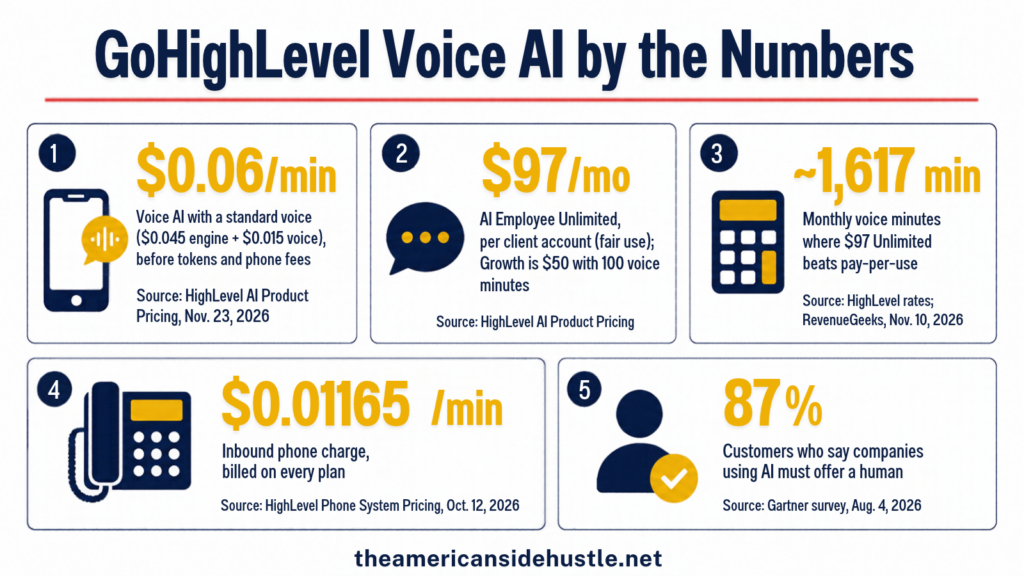
The Voice Engine rate is $0.045 a minute, effective May 20, 2026. Then you add the voice. The cheap ones, OpenAI’s TTS-1 and Cartesia’s Sonic 3, are $0.015 a minute. ElevenLabs voices run from $0.035 (Flash V2.5) up to $0.17 (V3 and V4). HighLevel’s own example: a 10-minute call on TTS-1 costs $0.60 before tokens and phone charges.
Then the phone line itself. HighLevel’s Phone System Pricing guide (updated October 12, 2026) lists inbound calls at $0.01165 a minute, outbound at $0.0166, call recording at $0.0025 and transcription at $0.024. And this part trips people up: the pricing article says phone charges “still apply even when Voice AI Inbound is covered by AI Employee Unlimited.” Unlimited covers the AI. It doesn’t cover the phone bill.
| Voice choice | Engine + voice, per minute | 300 inbound minutes (AI only) | Plus phone + recording |
|---|---|---|---|
| OpenAI TTS-1 or Cartesia Sonic 3 | $0.06 | $18.00 | +$4.25 |
| ElevenLabs Flash V2.5 | $0.08 | $24.00 | +$4.25 |
| ElevenLabs Multilingual V2 | $0.095 | $28.50 | +$4.25 |
| ElevenLabs V3 or V4 | $0.215 | $64.50 | +$4.25 |
| AI Employee Unlimited | $97 flat (fair use) | $97.00 | +$4.25 |
Sources: HighLevel AI Product Pricing Update (Nov. 23, 2026) and Phone System Pricing & Billing Guide (Oct. 12, 2026). The 300-minute volume is my example, not HighLevel’s. Phone + recording = 300 × ($0.01165 + $0.0025). AI model tokens are extra on pay-per-use.
So where does $97 Unlimited start making sense? On the standard voice, $97 divided by $0.06 is about 1,617 minutes a month. RevenueGeeks’ AI pricing analysis (updated November 10, 2026) landed on the same number, and only 451 minutes if you use the premium ElevenLabs V3 or V4 voices.
What Conversation AI costs per message
Here’s the thing a lot of old YouTube videos get wrong. RevenueGeeks points out that the $0.02-per-message and $0.13-per-minute figures floating around are no longer current. Conversation AI on pay-per-use is billed by tokens now, which is basically how much text goes into the AI model and how much comes out.
The recommended model in the official setup guide is GPT-6 Sol, at $2 per million input tokens and $10 per million output. The budget pick, GPT 6 Luna, is $0.10 and $0.50. Claude Opus 5.5 is $4.40 and $22. GPT 5.5 is $5 and $30.
Say each reply reads about 3,000 tokens of instructions and conversation history and writes about 150 tokens back. That’s my assumption, so your bot will differ. On those numbers, 1,000 replies cost roughly $7.50 on GPT-6 Sol, about 38 cents on GPT 6 Luna, $16.50 on Claude Opus 5.5 and $19.50 on GPT 5.5. And if the reply goes out as a text, add $0.00747 per SMS segment, plus carrier fees.
Translation: for most local businesses, the AI model isn’t the expensive part. The phone line, the texts and your setup time are.
What changed in the last few weeks
Three recent changes touch this setup.
- Safer editing. At its LevelUp Day on October 27, HighLevel announced Voice AI agent versioning, so you can edit and test a draft while “live callers remain unaffected,” with one-click rollback. It also announced cloning Voice AI agents into many sub-accounts at once, plus an Agent Health dashboard that reviews recent calls and chats and suggests a better prompt.
- A model is retiring. HighLevel’s changelog says, “OpenAI is deprecating GPT-4.1, and we will retire it in Conversation AI,” and recommends GPT-6 Sol “at about the same cost per reply.” A NetPartners weekly roundup puts the retirement date at December 15, 2026, with agents switching automatically after that.
- Model choice is spreading. On November 23, the official changelog added a beta picker in AI Studio to choose Claude, GPT or Gemini per message.
Here’s my take on GoHighLevel Voice AI
I’ll say it plainly. The cost is not the risk. The setup is the risk.
Look at that table again. Even the premium voice is cheap next to the alternative: a phone that rings out. CallRail’s survey of 1,000 U.S. consumers found 78% have taken their business elsewhere after failing to reach a company by phone, and 21% immediately call another business. I broke that pitch down in how I’d automate missed calls, texts and booking.
But here’s the uncomfortable part. People still want humans. A SurveyMonkey study of 2,017 U.S. adults found 79% strongly prefer dealing with a human over an AI agent, and only 8% prefer AI. And Gartner’s August 2026 survey of 3,566 customers found 87% say companies using AI for service must offer a way to reach a human agent.
Gartner analyst Eric Keller put it in one sentence: “Service leaders should not use GenAI as a mandatory first step for every issue.”
Voice AI is a safety net, not a wall. The second a caller wants a person, it should get out of the way.
And yes, I’m genuinely excited about this. A one-person agency can now give a three-chair dental office a 24/7 front desk for less than the cost of one lunch meeting a week. That’s the kind of leverage I talk about in why small businesses want AI but can’t set it up. The tools are cheap. The person who sets them up right is the scarce part.

What you actually need (and what it costs)
Here’s the starter kit, with prices from GoHighLevel’s official pricing page as of today:
- A HighLevel plan: Starter is $97 a month (three sub-accounts), Unlimited is $297 and Founder is $497. Every plan has a 14-day free trial, and the page says “Billing begins automatically at the end of any free trial unless canceled.” Usage fees can apply during the trial too.
- An AI Employee choice per client: pay-per-use, Growth at $50 or Unlimited at $97, per sub-account.
- A phone number: $1.15 a month for local, $2.15 for toll-free.
- Texting registration: if the AI sends texts to U.S. customers from a local number, HighLevel’s A2P 10DLC guide says registration “is required.” Per its fee article, a low-volume standard brand is $22.50 one time, then $10 a month for a standard campaign.
- Hidden extras: workflow AI actions like Intent Detection and Summarize Text cost $0.01 per run “regardless of the AI Employee subscription,” per the pricing article.
If you only have a client or two, the GoHighLevel Unlimited trial is where I’d build, because you’ll want room for a demo account of your own.
How I’d play it
If I were setting this up for a local business this week, here’s the exact order.
Step one: start with Conversation AI in Suggestive mode, not Voice AI. HighLevel’s help article on bot modes explains the three settings. Off does nothing. Suggestive “drafts reply messages for incoming conversations but does not send them automatically.” Autopilot replies on its own. Run Suggestive for a week or two. The owner sees every draft, fixes the weird ones, and you learn what customers really ask. Text mistakes are cheaper than phone mistakes.
Step two: feed it real answers, and tell it not to guess. Load the knowledge base with the business’s actual hours, prices, service area and policies. HighLevel’s Voice AI setup guide says it directly: “Tell the agent not to guess when required information is unavailable.” I’d add a line like “If you don’t know, say a team member will call back, and take their number.”
Step three: turn on Voice AI as the backup, after hours first. When you deploy, HighLevel gives you “Answer Calls Directly” or “Use as Backup,” and working hours of “All Hours” or a custom schedule. I’d start with backup and evenings and weekends. Humans answer during the day, and the AI catches what falls through. Keep the actions small: book an appointment, send a text, transfer to a person. Nothing else on day one.
Step four: wire the phone routing carefully. This is where most setups quietly break. The inbound call flow article says “Do NOT assign your default account phone number to your AI Agent,” and warns that if a caller hits local voicemail first, “HighLevel will mark the call as completed, and the Voice AI agent will not answer the call.” Shorten the forwarding timeout to a few seconds, then call the number yourself from a cell phone. Web Call tests don’t run call transfers.
Step five: pick the cheap voice first, then earn the upgrade. Start on a $0.015 voice. If callers complain it sounds robotic, test an ElevenLabs Flash voice at $0.035. Only move to the $0.17 premium voices if the business really needs them, because that’s more than triple the per-minute cost.
Step six: choose the plan after 30 days of real data. Look at the actual minutes and replies. Under about 1,600 voice minutes a month on a standard voice, pay-per-use is usually cheaper than Unlimited. And know the trap: on Growth, extra usage is “paused by default” once you hit the allowance, so a busy month can switch the AI off. Either turn on Extra Usage in AI Suite or set an alert.
Step seven: snapshot it and sell it as a service. Once it works, clone it. HighLevel now lets agencies clone Voice AI agents into several sub-accounts at once. Then automate the onboarding so new clients come in clean. That’s exactly what I showed in my form-to-account onboarding video. Comparing tools first? My rundown of no-code AI agent builders for small business is worth five minutes.
Watch-outs
Outbound AI calls are a different game. In a February 2024 declaratory ruling, the FCC confirmed that the phone law’s limits on an “artificial or prerecorded voice” cover AI-generated voices. Those calls need the prior express consent of the person you’re calling, unless an exemption applies. Law firm Cooley noted the ruling took effect immediately and recommended a legal review of any artificial-voice calling. HighLevel itself says outbound Voice AI “requires the applicable approval and compliance setup,” and its outbound settings include an AI disclosure and a verbal opt-out. Inbound first. Outbound only with consent and a lawyer’s read. I’m not a lawyer.
The business owns what the bot says. When Air Canada’s website chatbot gave a customer wrong refund information, a Canadian tribunal ordered the airline to pay about CA$812, CBS News reported. “It makes no difference whether the information comes from a static page or a chatbot,” wrote tribunal member Christopher Rivers. Your client’s AI is your client’s voice. Keep prices and policies in the knowledge base current.
“Unlimited” has fine print. It’s fair use, and phone charges still apply. RevenueGeeks also notes spending limits are off by default. Set limits and turn on rebilling so a client’s busy month doesn’t land on your card.
Models change under you. GPT-4.1 is on its way out of Conversation AI. HighLevel says to test before switching. Put a calendar reminder to re-test your bots whenever the changelog says a model is retiring.
Don’t oversell it. HighLevel’s own pricing page says AI features need “setup, configuration, and ongoing human oversight.” Never promise a client a number of new bookings. Promise the phone gets answered, then show them the call logs.
Quick answers
Does Unlimited cover phone costs? No. Per HighLevel, phone charges apply to all calls on every plan.
Can I test without a phone number? Yes, with the Web Call test, but call transfers don’t run there. Always finish with a real phone test.
Which do I set up first? Conversation AI in Suggestive mode, then Voice AI as an after-hours backup.
The bottom line
GoHighLevel Voice AI and Conversation AI are cheap enough now that cost shouldn’t stop a single local business from trying them. A few cents a minute. Under a penny a reply on most models, before texting fees. The real work, and the real value, is in the setup: honest answers, clean routing, a human one tap away, and somebody checking the logs every week.
Answer every call. Check every answer. That’s the play.
And if you’d rather start with the funnels, missed-call text-back and follow-up already built for you, that’s what we put together at The American Side Hustle. Earn in USD. Live anywhere.
Tools I’d use for this
- GoHighLevel Unlimited (14-day trial): room for unlimited client accounts plus your own demo account to build and test Voice AI.
- GoHighLevel Starter: $97 a month for up to three accounts, enough to try AI Employee on one or two clients.
- GoHighLevel Founder (Pro) trial: only when you want SaaS mode and markup on client usage, not on day one.
Some of these are affiliate links. If you sign up through them we may earn a commission, at no extra cost to you. See all our picks on the Recommended Tools page.
Photos: Antoni Shkraba, Jep Gambardella and Jessica Lewis on Pexels. Graphics: The American Side Hustle. Prices checked on official pages Nov. 24, 2026, and may change.
Ready to build your own American side hustle?
Get funnels, automated follow-up, text-to-pay and courses in one dashboard. Earn in USD, live anywhere.