You record your first business podcast in your kitchen. The fridge hums. Your co-host sounds like he’s calling from a cave. Your own voice jumps from whisper to shout every time you lean back.
You publish it anyway. The advice was good. Somebody even said it was great.
But most people didn’t make it past minute three, and they’ll never tell you why.
Bad podcast audio is the silent deal-breaker for small businesses trying to show up as the expert. The good news: fixing it is cheaper and simpler than most people think, and the biggest wins come before you ever touch an editing app.
Some links in this article are affiliate links. If you buy through them, we may earn a commission at no extra cost to you.



This one’s for you if you run a small business, a coaching practice or a side hustle and you want a podcast, a video show or a course that sounds like you know what you’re doing. I went through Apple’s audio rules, the loudness standards behind them, the research on how sound quality changes what people believe, and the audio playbook One Big Media Company (OBMC) publishes on its site. Full disclosure: OBMC lists The American Side Hustle among its work, so read this as a builder explaining a method, not a neutral review. I’m only using what OBMC actually publishes.
Here’s the line to remember: Fix the room before you fix the file.

Here’s what’s going on with podcast audio
The audience is huge, and they can leave in one tap
Podcasts aren’t a niche anymore. The Infinite Dial 2026 study from Edison Research at SSRS found 58% of Americans 12 and older, about 167 million people, listened to or watched a podcast in the past month, and 45% did in the past week, per the March press release. 57% have both listened to and watched one.
“Video isn’t replacing podcast audio. It’s expanding the tent.” — Megan Lazovick, vice president, Edison Research at SSRS
Video podcasts are moving to the TV, too. YouTube said viewers watched over 700 million hours of podcasts on living room devices in October 2025, up from 400 million hours a year earlier, according to YouTube’s December post. On a TV, through real speakers, bad audio is even harder to ignore.
And the competition is crowded. Listen Notes counts at least 3,838,216 podcasts and 198 million episodes, with 131,594 new shows started this year. Nobody has to put up with a hard-to-hear one.
Bad sound makes you sound less smart
This is the part that got me. Researchers Eryn Newman and Norbert Schwarz ran two experiments, one with 97 people watching conference talks and one with 99 people hearing NPR science interviews, as USC News reported. Same speakers, same content. They just made the audio worse for some listeners. The paper, “Good Sound, Good Research,” ran in the journal Science Communication in 2018.
The result: with poor audio, speakers came across as less intelligent and less likeable, and their work seemed less important. Newman’s summary: “As soon as we reduced the audio quality, all of a sudden, the scientists and their research lost credibility.” Schwarz put it even more simply: “When you make it difficult for people to process information, it becomes less credible.”
If that happens to scientists on NPR, it happens to a plumber, a realtor or a business coach on YouTube.
The platforms have a target, and it’s a number
Apple is clear about what it wants. Its audio requirements say episodes should sit “around -16 dB LKFS, with a +/- 1 dB tolerance,” and “the true-peak value doesn’t exceed -1 dB FS.” LKFS and LUFS are the same unit. It’s a measure of how loud your show feels to a listener, calculated with the ITU’s BS.1770 standard, now on version 5 from November 2023. For comparison, European broadcasters work to the EBU R 128 recommendation of -23 LUFS, which is quieter.
| Setting | Target | Source |
|---|---|---|
| Podcast loudness | -16 LKFS, plus or minus 1 dB | Apple Podcasts |
| True peak ceiling | -1 dBFS or lower | Apple Podcasts |
| Master file (upload) | WAV or FLAC, 24-bit recommended, 44.1 kHz minimum | Apple Podcasts |
| MP3, mono voice | 96 to 128 kbps recommended | Apple Podcasts |
| MP3, stereo | 128 to 256 kbps recommended | Apple Podcasts |
| Broadcast loudness (for comparison) | -23 LUFS | EBU R 128 |
| Dynamic mic distance | 2 to 6 inches from the grille | RØDE |
Sources: Apple Podcasts audio requirements, EBU R 128, RØDE microphone technique guide. Checked Nov. 25, 2026.
The OBMC playbook for podcast audio
OBMC’s audio engineering page opens with a line I agree with completely: “Audiences will tolerate modest visuals longer than distracting, inconsistent, or unintelligible audio.”
What I like about its approach is that it treats sound as a system, not a rescue job. The problems it lists aren’t about gear. They’re about process: voice levels that vary between speakers or episodes; noise, room echo, hum and clipping; editors spending “excessive time repairing preventable problems”; and the big one, “Recording settings change because no capture standard exists.”
OBMC’s work moves in six steps: Assess, Prepare, Clean, Mix, Master, Deliver. The last one includes “improved capture recommendations,” meaning the end of one episode is supposed to make the next one easier to record. Its video production page calls out the same issue from the camera side: “Visual and audio quality changes dramatically from one release to the next.”
And I like that it’s honest about limits. Its FAQ asks, “Can all damaged audio be repaired?” and answers, “No.” Some clipping, distortion or heavy noise can’t be fully fixed, so it reviews the source before promising a result. The page also lists “Responsible claims: No fabricated guarantees, testimonials, urgency, or performance numbers.” OBMC doesn’t publish prices for this work, so I won’t guess.

Here’s my take on podcast audio for small businesses
Okay. Real talk.
Most small business owners spend money in the wrong order. They buy a $400 mic, record in an empty room with hard walls, then pay for an AI cleanup tool to undo the echo. It’s like buying a sports car and driving it on gravel.
Here’s the order that actually works. Room first, because nothing removes echo as well as not recording it. Mic placement second, because RØDE says “the biggest mistake many content creators make is having the microphone too far away.” Then gentle cleanup. Then loudness. The fancy tools are the last 10%.
And I’d be careful with AI “make it sound like a studio” buttons. They’re useful, but push them too hard and voices start sounding processed, like a robot reading your script. OBMC’s page names the goal well: clearer and more consistent audio “without making speech sound artificial.” Clean, not plastic.
The real win is consistency. If every episode sounds the same, people stop noticing the audio and start listening to you. That’s the whole point. You want to sound like a business people can trust with their money, and getting that right gives you an edge most of your competitors don’t bother with.
What you actually need for podcast audio (and what it costs)
- A dynamic mic and a stand: RØDE’s guide says keep your mouth 2 to 6 inches from a dynamic mic’s grille, or 6 to 12 inches for a condenser, and that getting close helps “reduce background noise.” I’m not naming a price here, since mic prices swing during holiday sales. Any decent USB dynamic mic from a known brand is plenty to start.
- A soft room: free. A closet full of clothes, a bedroom with a rug and curtains, or blankets on the walls behind you.
- Editing and cleanup: Descript has a free plan with limited access to its Studio Sound cleanup. Paid plans run $16 a month billed yearly ($24 monthly) for Hobbyist and $24 a month yearly ($35 monthly) for Creator, per Descript’s pricing page, with Studio Sound included. Adobe Podcast Enhance calls itself a “Free AI filter for cleaning up spoken audio.”
- Music you’re allowed to use: OBMC’s FAQ puts it plainly: licensed music “must come from an approved source with terms appropriate to the intended use.” For YouTube, the Audio Library offers “royalty-free production music and sound effects,” and tracks you download there “won’t be claimed by a rights holder through the Content ID system.” Some tracks need credit in your description. For use outside YouTube, buy a license from a music library whose terms cover podcasts.
- Headphones: any closed pair you already own, so you hear what the mic hears.
You can start for the cost of a mic and Descript’s free plan. That’s the honest floor.
How I’d play it: a recording standard in seven steps
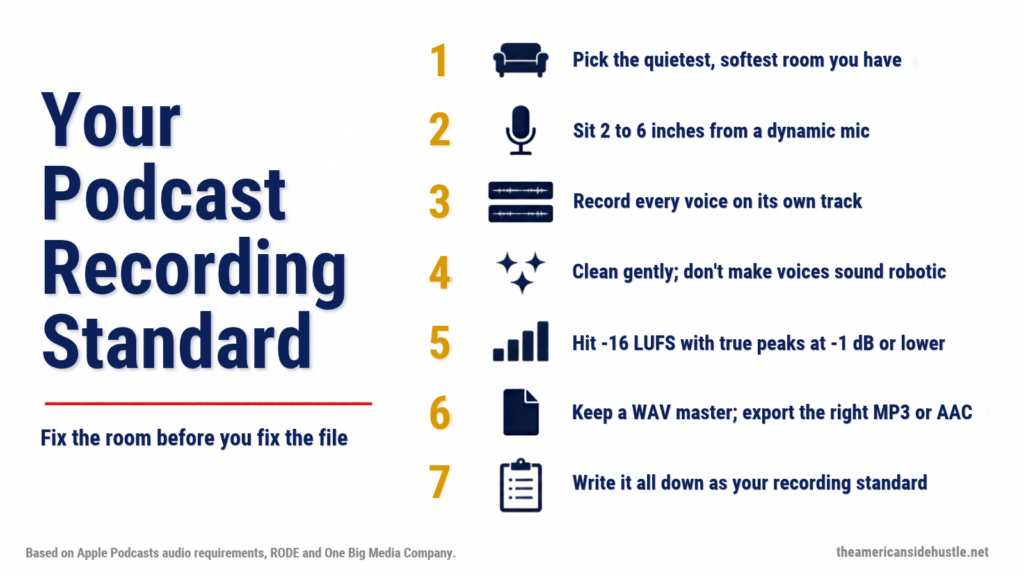
Step one: pick the quietest, softest room you have. Clap once. If it rings, add soft stuff: rugs, curtains, a couch, a bookshelf, blankets. Turn off the fridge, the AC and notifications. Five minutes here saves an hour of editing.
Step two: get close to the mic, and stay there. Dynamic mic, 2 to 6 inches from your mouth, slightly off to the side so your P’s don’t pop. Mark the spot on the desk with tape so you sit the same way every week.
Step three: record every voice on its own track. If you have a guest, record each person separately, locally if your recording tool allows it. Save the original uncompressed files. OBMC’s FAQ says “Original uncompressed recordings are preferred” for a reason: you can’t add back what compression threw away.
Step four: clean gently. Remove the obvious stuff: hum, clicks, long dead air, the dog. Run a cleanup tool at a modest setting, then listen on headphones and on your phone speaker. If you sound like a robot, back it off.
Step five: hit the loudness target. Balance the voices so nobody’s whispering and nobody’s shouting, then bring the whole episode to about -16 LUFS with true peaks at or below -1 dB, as Apple asks. Most editing tools have a loudness or “normalize” setting that does this. OBMC defines loudness normalization as “the controlled adjustment of perceived program level to meet a platform or delivery target while managing peaks and dynamics.” That’s exactly what you’re doing.
Step six: export the right file. Keep a WAV master. For your podcast host, follow Apple’s guidance: for a voice-only MP3, mono at 96 to 128 kbps is recommended, and Apple says AAC sounds better than MP3 at the same bitrate if your host supports it. Add chapters if your platform allows it. Apple recommends that too.
Step seven: write it down. This is the OBMC idea that makes everything else stick: a capture standard. One page with your room, mic, distance, input level, file names, cleanup settings and loudness target. Anyone on your team, or a future editor, can follow it. Every episode starts from the same place. If you’re building a broader content system around the show, my notes on planning an AI and automation stack without vendor sprawl fit right here.
Watch-outs
Not everything can be saved. If a recording clipped hard or the noise drowned the voice, no tool will fully fix it, and OBMC’s FAQ says so. Re-record the important parts.
Don’t chase loud. Louder isn’t better once apps normalize volume. Apple says it uses loudness data for Sound Check, which plays content at -16 dB. Over-squashed audio just sounds tiring.
Music rights don’t travel. YouTube’s Audio Library page covers YouTube videos. It doesn’t say anything about use outside YouTube, so don’t assume a track is cleared for your podcast feed or your ads.
AI voices are a different topic. Cleaning up your own voice is one thing. Generating or cloning a voice is another, with its own rules and consent questions. I covered that side in the AI voice side hustle.
Gear won’t fix a weak show. Great sound helps people stay. It won’t make them care. You still need a clear promise and a reason to come back. Here’s how I’d think about the bigger product side of a small studio.
Quick answers
Do I need a studio? No. A soft room, a close mic and a consistent setup get you most of the way.
Is -16 LUFS right for YouTube too? Apple’s -16 is a solid, widely used podcast target. YouTube’s own target wasn’t on any page I opened, so I’m not quoting a number for it.
Should my podcast be video? If you can, yes. Edison found 57% of Americans 12+ have both listened to and watched a podcast. But audio quality matters either way. People will forgive a plain background before they forgive bad sound.
The bottom line
Most listeners won’t tell you your audio is bad. They’ll just leave, and research shows they’ll think a little less of you on the way out. The fix isn’t a fancy mic. It’s a quiet room, a close mic, gentle cleanup, a loudness target and a written standard you follow every single week.
Fix the room before you fix the file.
And when your show starts bringing in listeners, you’ll want a way to turn them into leads and customers: a landing page, follow-up emails and an easy way to pay. That’s what we built at The American Side Hustle. If you’d rather have a team handle audio as part of a bigger media system, that’s the work One Big Media Company describes as “Media Is the Mission. Technology Is How We Scale It.”
Tools I’d use for this
- Descript: edit audio like a document, with Studio Sound cleanup on paid plans.
- CapCut: cut short vertical clips from your video podcast for social.
Some of these are affiliate links. If you sign up through them we may earn a commission, at no extra cost to you. See all our picks on the Recommended Tools page.
Photos: SERHAT TURAN, kaboompics and Egor Komarov on Pexels. Graphics: The American Side Hustle. Prices checked on official pages Nov. 25, 2026, and may change.
Ready to build your own American side hustle?
Get funnels, automated follow-up, text-to-pay and courses in one dashboard. Earn in USD, live anywhere.