
The envelope comes back. Same one you mailed three weeks ago.
Inside is your whole packet, plus a one-page notice. Wrong fee. Or a missing signature. Or page 7 is from an older version of the form.
No one looked at your evidence. No one read your story. The packet never got in the door.
That’s the part that stings. Knowing why USCIS rejects applications before you mail yours matters, because most rejections come from small, fixable paperwork mistakes, not from anything about your case.
This one’s for you if you’re filing a USCIS form yourself, for you or a family member, and you want it to go through the first time. I went through the official uscis.gov pages, the USCIS Policy Manual, the current fee schedule and the newest signature rule. Practical, step-by-step. Just the paperwork.



Quick note: this is general information, not legal advice. I’m not a lawyer. If your situation is complicated, talk to a licensed immigration attorney or a DOJ-accredited representative.
Here’s the line to remember: Check it twice. File it once.

Here’s what’s going on: why USCIS rejects applications
Two words people mix up. A rejection means USCIS didn’t accept your filing at all, and you start over. A Request for Evidence, or RFE, means it was accepted, but an officer needs more proof. Both cost time.
One in nine filings got sent back last year
This is the number that made me slow down. According to USCIS’s own Lockbox Filing Information page, its lockbox locations processed more than 10 million applications in fiscal year 2025 and rejected 11% of them. (A lockbox is the intake facility where paper filings get opened and checked.) USCIS says plainly that the most common reason is that people “did not submit the correct fee amount.”
CitizenPath, an online immigration-form service, did the math in an August 18, 2026 guide by co-founder Russ Leimer and attorney Cesar Luna: roughly 1.1 million packages sent back. Their bluntest line: “USCIS rejects any benefit request with an improper signature and gives you no chance to correct it.”
The four official reasons, in USCIS’s own words
The USCIS Policy Manual, Volume 1, Part B, Chapter 6, lists the main grounds for rejecting a filing at intake:
- “Incomplete benefit request”
- “Improper signature or no signature”
- “Use of an outdated version of a USCIS form at time of submission”
- “Incorrect fee, including missing fees or fees in the wrong amount”
The line that matters most: “The rejected case does not retain its original filing date when resubmitted.” If you’re racing a deadline, that hurts. The same chapter says filing fees “generally are non-refundable.”
| Mistake | What USCIS says | The fix |
|---|---|---|
| Wrong fee amount | Most common lockbox rejection reason in FY2025 | Use the Fee Calculator the day you mail |
| Paying by check or money order | Paper payments not accepted since Oct. 28, 2025, unless exempt | Form G-1450 (card) or G-1650 (bank debit) |
| Outdated or mixed edition | All pages must be the same, current edition | Download fresh from the form’s page; check every footer |
| Missing or invalid signature | No chance to “cure” a deficient signature | Handwritten signature on every signature line |
| Incomplete form | Incomplete requests are rejected | Answer every question; include every page |
| Missing required initial evidence | Can lead to rejection, an RFE or denial | Follow the form instructions’ evidence list line by line |
Sources: USCIS Lockbox Filing Information, Filing Fees and Tips for Filing Forms by Mail pages; USCIS Policy Manual Vol. 1, Parts B and E. Checked Nov. 24, 2026.
Mistake one: the fee (and how you pay it)
First, how you pay. Per the Policy Manual’s fees chapter, “As of October 28, 2025, USCIS no longer accepts paper-based forms of payment.” The Filing Fees page spells it out: no personal or business checks, no money orders, no cashier’s checks for paper filings, unless you qualify for an exemption. And “We do not support payment by gift cards.”
By mail, you pay with Form G-1450 (credit, debit or prepaid card) or Form G-1650 (a debit from a U.S. bank account). Both go on top of your packet. Details that trip people up:
- G-1450 says “We cannot accept a credit card issued by a foreign bank.” G-1650 only pulls from U.S. banking institutions. If you live abroad, sort this out early.
- If your card is declined, the Policy Manual says “USCIS does not attempt to process the credit card payment a second time.” Your filing can be rejected for lack of payment.
- Don’t split one fee between a card and a bank debit, and don’t use one G-1450 for several forms. The Policy Manual lists both as grounds for rejection.
The exemption form is G-1651, mainly for people without access to banking or electronic payments. It must go in the same envelope as your application, never separately.
Second, the amount. The fee schedule, Form G-1055, is now on its 11/19/26 edition. And per the Forms Updates page, USCIS posted new G-1055 editions on Oct. 1, Oct. 7, Oct. 16, Oct. 26 and Nov. 19, 2026. That’s five editions in about seven weeks. Last month’s fee might not be today’s.
Mistake two: the wrong edition of the form
Every USCIS form has an edition date at the bottom of each page. The lockbox page: “All pages of the forms that you file must be completed with the same, current edition of the form or we will reject it.”
Editions change often. The Forms Updates page shows a new Form I-131 edition (04/22/26) posted Nov. 19, and “Starting Dec. 21, 2026, we will accept only the 04/22/26 edition.” Form I-864, the Affidavit of Support, moved to an 08/24/26 edition, and since Oct. 1, 2026, that’s the only one accepted. Form I-485 is on 09/18/26. Meanwhile Form I-130 is still on 04/01/24 and Form N-400 on 01/20/25. No rule of thumb. Check each form, every time.
Mistake three: the signature
This one got stricter this year. The Policy Manual’s signatures chapter says “USCIS does not accept signatures created by a typewriter, word processor, stamp, auto-pen, or similar device.” It “does not need to be legible or in English,” but it must be yours, by hand. And “USCIS does not provide an opportunity to replace, correct, or cure a deficient signature.”
Then, on May 11, 2026, DHS published an interim final rule on signatures effective July 10, 2026. If USCIS accepts your filing and later finds the signature wasn’t valid, it “may, in its discretion, reject or deny the request.” A scanned or copied version of a wet-ink-signed form is fine.
“Sign it right or risk losing your case.” — Ann Lee, partner at Holland & Hart, May 14, 2026
Courtney D’Entremont of the law firm Mintz flagged the timing problem in a June 11 analysis: “such defects may be identified months or years after filing.”
Mistake four: the wrong address
Where you mail depends on the form, and sometimes where you live. The I-130 page says to file “at the Chicago or Phoenix lockbox, depending on where you live.” Send it to the wrong place and USCIS “may forward” it, or return it. And per the Tips for Filing Forms by Mail page, if you already filed online, don’t also mail a paper copy. That gets rejected.
Mistake five: missing evidence, which leads to an RFE (or worse)
Some evidence is required at the door. The I-485 page says the medical exam form, I-693, “you must submit it with your Form I-485. Otherwise, we may reject your Form I-485.” Other gaps lead to an RFE. The Policy Manual’s evidence chapter sets the maximum RFE response time at “12 weeks (84 days),” plus 3 days if it’s mailed. (30 days for I-539 and I-601A.) It also says “Initial evidence is a threshold requirement,” and USCIS can deny for lack of it without asking first.
Here’s my take on avoiding a USCIS rejection
Most of the rejections above have nothing to do with whether you qualify. They’re clerical. A fee that changed. A footer from last year’s version. A signature box nobody signed. That’s good news. Clerical problems are the kind you catch with a checklist and twenty quiet minutes.
What worries me is feeling “done” too early. You’ve gathered the certificates, the tax returns, the photos. You’re tired. You print the form you downloaded in the summer. That’s exactly when the fee or the edition has moved underneath you.
So treat the last 24 hours before mailing as their own step. Re-check the fee, the edition, the address and every signature from the official page, that day. Not from memory. Not from a forum post.
And be honest with yourself about complexity. If there’s a past immigration issue, a criminal record, a prior denial or a deadline tied to your status, that’s lawyer territory. The USCIS scams page is clear that only “an attorney or an accredited representative working for a Department of Justice recognized organization” can give you legal advice, and that a “notario público is not authorized to provide you with any legal services related to immigration.” And USCIS forms themselves are free.
Same lesson as with digital nomad visa applications: the paperwork is the gate. Get it right, and everything after gets easier.

What you actually need (and what it costs)
Here are a few common filing fees from the current fee schedule, G-1055, edition 11/19/26. The schedule says “There is often a $50 discount when filing a form online,” and the numbers show it.
| Form | What it’s for | Paper | Online |
|---|---|---|---|
| I-130 | Petition for Alien Relative | $675 | $625 |
| I-485 | Adjustment of status (general filing) | $1,440 | $1,390 |
| N-400 | Naturalization (general filing) | $760 | $710 |
| I-751 | Remove conditions on residence | $750 | $700 |
| I-90 | Replace a Green Card | $465 | $415 |
| I-129F | Fiancé(e) petition (general filing) | $675 | — |
Source: USCIS Form G-1055, Fee Schedule, edition 11/19/26. Special cases differ; I-765 and I-131 fees vary. Confirm with the Fee Calculator.
Beyond the fee, here’s the kit:
- The current form, fresh from the USCIS All Forms list. Free.
- The Fee Calculator, which USCIS says “provides G-1055, Fee Schedule, information for all USCIS forms.” Free.
- A U.S. card or bank account that covers the whole fee.
- A USCIS online account, if your form can be filed online. The forms available online page lists I-90, I-130, I-131, I-765 and N-400 among the fill-online forms, and others, like I-485 and I-751, as PDF uploads.
- A review step. This can be a second set of eyes, a lawyer, or software. Full disclosure: FormVeritas is our own product. FormVeritas is USCIS form-review software that audits a form answer by answer and flags blank required fields, skipped Yes/No questions, conflicting dates and missing signatures. Its site lists a free tier with one audit and a $39 one-time Single Petition plan, and says clearly that it’s not a law firm and doesn’t guarantee approval.
Can’t afford the fee? Read the fee waiver guidance first. USCIS lists the usual reasons waiver requests get rejected: Form I-912 not signed, no box checked in Part 1, no evidence of eligibility, foreign-language documents without a certified English translation, or sending the I-912 without the actual application.
How I’d play it
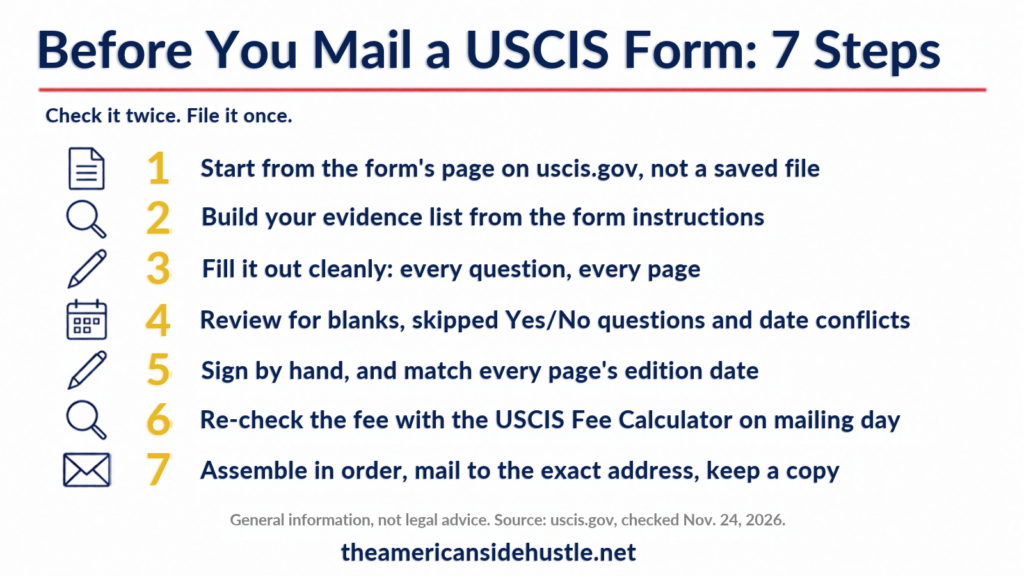
Step one: start from the form’s own page, not a saved file. Open the form’s page on uscis.gov and read the edition date, the “Where to File” section and the fee note. Download the form and instructions that day. Write the edition date on a sticky note for step five.
Step two: build the evidence list from the instructions. Copy every required document from the instructions into a checklist. If a translation is needed, get a full English translation with the translator’s certification, as the USCIS Five Steps to File guide describes. Send copies, not originals, unless originals are requested.
Step three: fill it out cleanly. Type if you can. If you write by hand, use black ink. Answer every question that applies. Watch each form’s special rules. The I-130 page, for example, says to select “1 and only 1 option for Part 4 (Question 61 or 62).” Made a mistake on paper? Start fresh. No correction fluid.
Step four: run a review before anyone signs. This is where I’d use a tool like FormVeritas or a careful second reader. Hunt for blanks, skipped Yes/No questions and dates that don’t line up. Fix, then check again, before anything is signed.
Step five: sign, then check every signature line. Each person signs their own form by hand. A parent may sign for a child under 14. An attorney’s G-28 “by itself does not authorize a representative to sign,” per the Policy Manual. Then compare every page footer to your sticky note. Same edition, every page.
Step six: re-check the fee on mailing day. Run the Fee Calculator again. One G-1450 or G-1650 per form, same method across the package. The mail tips page warns that if you pay several forms with one payment and one form is defective, “we must reject the entire package.”
Step seven: assemble, mail and track. Follow the order in the Five Steps guide: photos, payment form, G-1145 if you want e-notification, G-28 if you have a representative, the forms, supplements, then evidence. Single-sided, letter-size, no binders. Use the full address, including the “Attn” line. Keep a complete copy and the tracking number. If you move later, file your address change within 10 days (see the AR-11 page).
Watch-outs
Rejection resets your clock. If you’re near a deadline, mail early and leave room for one more try.
Fees can change between your research and your mailing. Five fee schedule editions since Oct. 1 is the proof. Posts like this one age fast. Trust the official page on filing day.
An RFE has a clock too. Up to 84 days, plus 3 for mail, for most forms. Respond with everything at once. A partial answer is treated as a request for a decision on the record.
Be careful who “helps.” Only attorneys and DOJ-accredited representatives can give legal advice. Sites that don’t end in .gov but charge for blank forms are a red flag. Review software, including ours, checks paperwork. It doesn’t replace a lawyer.
Living abroad? Plan the payment early. Payment needs a U.S. card or bank. If you earn in USD while living abroad, keep a U.S. account in good standing.
Quick answers
What happens to my fee? If the lockbox rejects your filing, it sends the package back with a rejection notice, and you start over with a new submission. If USCIS accepts the case and later denies it, the Policy Manual says fees “generally are non-refundable.” That’s why getting it right up front matters.
Is filing online safer? USCIS’s online filing page says it helps you “avoid common mistakes,” and you often save $50. Not every form qualifies.
The bottom line
Most USCIS rejections come down to the same handful of things: the fee, the payment method, the edition, the signature, the address and the required evidence. None are about whether you qualify. All are about whether the packet gets in the door.
So slow down at the finish line. Pull everything from uscis.gov on mailing day. Review before anyone signs. Then mail it once.
Check it twice. File it once.
And once the paperwork is handled and you’re back to building your income, we put the tools for that in one place at The American Side Hustle: funnels, follow-up and text-to-pay, so you can earn in USD from wherever life takes you.
Tools I’d use for this
- FormVeritas: USCIS form-review software that helps you catch mistakes before you file.
- One Big Media Company: the team behind this site, for when you need a product built.
These are our own companies. See all our picks on the Recommended Tools page.
Photos: RDNE Stock project, Mikhail Nilov and Pixabay on Pexels. Graphics: The American Side Hustle. Prices checked on official pages Nov. 24, 2026, and may change.
Ready to build your own American side hustle?
Get funnels, automated follow-up, text-to-pay and courses in one dashboard. Earn in USD, live anywhere.