




You finally got into the YouTube Partner Program. The dashboard says you earned $63 this month.
The 21st comes. Nothing.
The 26th comes. Still nothing. You check your bank twice a day for a week.
Here’s the thing nobody tells you when you start: earning money on YouTube and getting paid by YouTube are two different skills. If you want to know how YouTube pays creators, you have to learn the calendar, the thresholds and the tax forms. And a couple of those just changed.
Some links in this article are affiliate links. If you buy through them, we may earn a commission at no extra cost to you.



This one’s for you if you’re newly monetized, close to it, or you’ve been confused about why your money shows up when it does. I went through YouTube’s payment help pages, its tax page, its partner terms, its experiments log, and the trade coverage of what’s new this fall. Here’s how the money actually moves, and what I’d set up before December 10.
Remember this: The views earn it. The paperwork pays it.
Here’s what’s going on with how YouTube pays creators
The news: some creators can cash out at $20 now
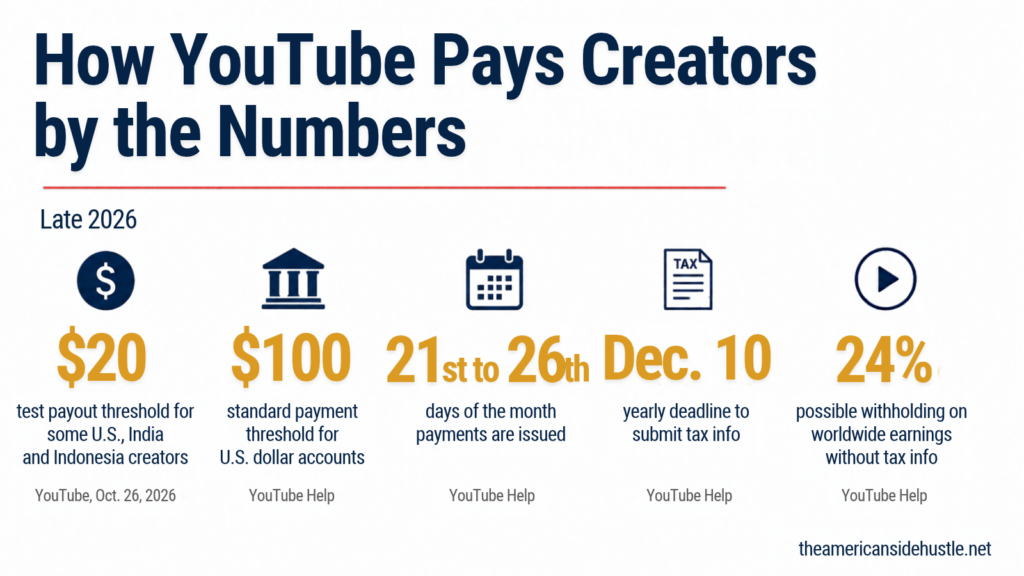
On October 26, YouTube posted in its test features and experiments log: “To offer creators more flexibility, we’re temporarily running an experiment that lowers the minimum payment threshold to receive payments from $100 USD to $20 USD.” It applies starting with October 2026 payments for a randomly selected group of creators in the U.S., India and Indonesia. If you’re in it, you’ll get a notification, and you can track payments in YouTube Studio on mobile. Don’t want it? You can raise the threshold in AdSense for YouTube.
Social Media Today’s Andrew Hutchinson noted that YouTube calls the test temporary, and money that doesn’t hit the threshold still rolls over to the next month. Tubefilter’s Sam Gutelle pointed out that the $80 difference is small for many American creators but a big deal in India and Indonesia. It also doesn’t change who gets into the Partner Program. It just changes how soon you can touch your money.
The standard payment calendar
For everyone else, the system is the same, and it runs on a fixed monthly schedule. Per YouTube’s payment process page, your estimated earnings can be adjusted after the month ends for invalid traffic, copyright claims and taxes. Then the calendar kicks in.
| When | What happens |
|---|---|
| During the month | Earnings accrue as estimates |
| 7th to 12th of next month | Last month’s earnings are finalized and posted, with any deductions |
| By the 20th | Balance must meet your threshold; payment info changes and hold removals must be done |
| 21st to 26th | Payment is issued; “Payment pending” appears |
| After issue | EFT up to 7 business days; wire up to 15 business days; check 2 to 4 weeks |
Source: YouTube Help, AdSense for YouTube payment process. Checked Nov. 25, 2026.
So October’s earnings get finalized in early November and paid in late November. Your money is always about a month and a half behind your views. And YouTube is blunt about speeding it up: “we can’t issue payments outside of our standard payment timeline.”
The five thresholds most creators never read
YouTube’s thresholds page lists five for U.S. dollar accounts. Tax info is $0, meaning you have to submit it right away. Verification is $10, when you confirm your identity and address. Payment method selection is also $10. The payment threshold is $100 (or $20 if you’re in the test). And if you close your account with more than $10, you get a final payment about 90 days after the month ends.
That $10 verification step trips people up. Google’s AdSense help says it mails a six-digit PIN to your address, which takes about three weeks, and you can request a replacement if it doesn’t show, per its address verification page. If you moved and didn’t update your address, that PIN is going to your old place.
The tax deadline coming up: December 10
This is the date to circle. YouTube’s U.S. tax requirements page says to submit your tax info, and any tax treaty claim, by December 10 each year.
If you’re a U.S. creator, that means a W-9 in AdSense for YouTube, and Google “will not withhold taxes on earnings if you’ve provided valid tax info.” You’ll get a Form 1099-MISC, usually by early March. If you’re outside the U.S., Google withholds between 0% and 30% on earnings from U.S. viewers only, depending on whether your country has a tax treaty with the U.S. Skip the tax info entirely and Google may withhold up to 24% of your total worldwide earnings. Not just U.S. earnings. All of it.
Your cut, in writing
It helps to know what you’re getting a share of. YouTube’s partner earnings overview says it pays 55% of net revenue from ads on your long-form watch pages and 45% of your share of the Shorts Creator Pool. On memberships, Super Chat, Super Stickers and Super Thanks, the rate is 70%. And on Shorts, “Monetizing creators will keep 45% of their allocated revenue, regardless if music was used or not,” per the Shorts monetization policy.
The same page includes a line every creator should read twice: “There are no guarantees under the YouTube partner agreement about how much or whether you’ll be paid.”
Here’s my take on YouTube payouts
Okay. Real talk.
The $20 test is nice. I’m glad it exists. But if you’re in the U.S., it’s not the story. You’ll get the same money, just sooner. The story is that most creators lose real money and real time on stuff that has nothing to do with content: a missing W-9, a PIN mailed to an old apartment, a bank change made on the 22nd instead of the 19th.
That’s fixable in an afternoon. And it matters more now, because getting in is about to get harder. Starting February 1, 2027, new applicants need 8,000 watch hours or 20 million Shorts views, per YouTube’s August announcement. I broke that down in YouTube’s new monetization bar. Tech journalist Emil Protalinski, who has a small channel himself, wrote on LinkedIn, as Entrepreneur reported, that under the new bar “it seems a fool’s errand to try.”
I don’t agree with that, but I get it. If you’re in, protect it. If you’re close, get in before the deadline.
Here’s the other thing. YouTube can pay well. It says it paid $100 billion to creators, artists and media companies over the past four years, Tubefilter reported. Personal finance creator Erika Kullberg told Entrepreneur in 2024 that YouTube is “by far” her highest-paying social platform. But even she said to make sure you have enough savings before going full time. Smart. AdSense is a paycheck that comes six weeks late and carries no guarantee. Treat it like that.

What you actually need (and what it costs)
Good news: getting paid by YouTube costs nothing. Here’s the checklist:
- An AdSense for YouTube account linked to your channel, with your legal name and current mailing address. Free.
- Tax info: a W-9 if you’re a U.S. creator, or the right foreign form plus any treaty claim if you’re not. YouTube says tax forms expire at the end of the third full calendar year after you sign them, so an old one may need redoing.
- A payment method: EFT to a bank account is the simplest for U.S. creators, at up to seven business days after the payment is issued.
- Money set aside for taxes: If you’re in the U.S. and YouTube doesn’t withhold, nobody is withholding for you. The IRS’s estimated taxes page says you generally need to pay quarterly if you expect to owe $1,000 or more, and that includes self-employment tax. My year-end tax moves for freelancers apply to creators too.
- Clean audio: Copyright claims can send revenue to the claimant. YouTube’s free AI music tool now helps replace claimed songs (more below). For editing, I like Descript because you can cut and fix audio by editing a transcript.
How I’d set up YouTube payouts
If you just got monetized, or you’re about to, here’s the order I’d do it in this week.
Step one: submit or check your tax info before December 10. Log in to AdSense for YouTube and find your tax info in the payments settings. If it’s missing, expired or has your old address, fix it now. YouTube says if you move, you must resubmit the W-9 with your new legal address. This is the step that costs people the most money, because skipping it can mean up to 24% withheld from everything.
Step two: make sure your address is right, then watch for the PIN. Once you pass $10, you’ll need to verify. That PIN comes by regular mail and can take about three weeks. Put a reminder on your calendar. If it hasn’t come in three weeks, request a new one instead of waiting forever.
Step three: pick your payment method and lock it in by the 19th. The 20th is the cutoff, and “Changes made after the 20th won’t take effect until the next month’s payment cycle.” I’d never touch bank details after the 15th of any month. Give yourself a buffer.
Step four: check your threshold setting. If YouTube put you in the $20 test, you’ll get a notification. If you’d rather get fewer, bigger payments, you can raise it in AdSense. For most new creators, I’d keep it low. Seeing money arrive every month keeps you going.
Step five: clear copyright claims before they eat your revenue. On November 3, YouTube expanded its AI music tool to most countries outside the European Economic Area, PPC Land reported. In YouTube Studio’s Replace song tool on desktop, it generates four three-minute instrumental tracks, and the Content ID claim comes off once all claimed audio is replaced. One catch: saved edits can’t be undone, so download your original first.
Step six: stay far away from spam flags. Tubefilter’s James Hale reported on November 3 that YouTube is testing a 30-day lock for some channels flagged under its spam policy, instead of instant termination. That’s better than before, but a locked channel can’t upload. And a genuine stop-motion channel, Tiny Grandma, was wrongly flagged as AI and demonetized. If you use AI in your workflow, read my guide to faceless YouTube channels and the AI rules.
Step seven: don’t let AdSense be your only payday. That 70% share on memberships, Super Chat and Super Thanks is better than the ad split. Turn on fan funding, test YouTube Hype with Jewels, and start an email list with Kit so your best viewers can follow you anywhere.
Watch-outs
Don’t spend your estimated earnings. YouTube adjusts them for invalid traffic, copyright claims and taxes before they’re final. Budget from the finalized number, not the live dashboard.
Don’t assume the $20 test is coming for you. It’s random, it’s in three countries, and YouTube calls it temporary. Plan around $100.
Don’t change bank info late in the month. Every change after the 20th pushes your payment a full month. Same with removing payment holds.
Don’t run up a Google Ads bill you haven’t paid. If you promote your videos with ads and owe Google money, YouTube’s payment timelines page says it reserves “the right to withhold payment until all outstanding payments have been made.” Pay the ad bill first.
Don’t forget it’s taxable income. U.S. creators get a 1099-MISC. Keep receipts for gear, software and editing help.
Don’t build on AdSense alone. YouTube’s own terms say there’s no guarantee about how much or whether you’ll be paid. Spread your income out.
Quick answers
When will I get my first YouTube payment? Once your finalized balance reaches your threshold by the 20th, payment goes out between the 21st and 26th. With a $100 threshold, small channels may wait a few months while it rolls over.
Can I get paid early? No. YouTube says it can’t issue payments outside its standard timeline.
I’m outside the U.S. Do I still need U.S. tax info? Yes. YouTube’s thresholds page says you need to submit it no matter your location, and withholding applies to U.S. viewer earnings at 0% to 30% depending on treaties.
The bottom line
How YouTube pays creators isn’t complicated, but it’s strict. A monthly calendar, a handful of thresholds, one tax form and one mailed PIN. Miss any of them and your money sits there. The new $20 test helps a lucky few cash out sooner, but the creators who get paid on time are the ones who handle the boring stuff early.
So do it this week. Tax info before December 10. Address checked. Payment method set before the 20th. Claims cleared. Then go back to making videos.
The views earn it. The paperwork pays it. That’s the play.
And when your channel starts sending viewers to your own offers, you’ll want landing pages, email follow-up and checkout in one place, not five apps. That’s what we built at The American Side Hustle. Earn in USD. Live anywhere.
Tools I’d use for this
- Descript: edit video by editing the transcript, and clean up audio before you upload.
- Kit: a free email list so your best viewers aren’t tied to one platform’s payouts.
- CapCut: fast Shorts editing for the 45% Shorts revenue pool and channel growth.
Some of these are affiliate links. If you sign up through them we may earn a commission, at no extra cost to you. See all our picks on the Recommended Tools page.
Photos: Mikael Blomkvist, Tranmautritam and SHVETS production on Pexels. Graphics: The American Side Hustle.
Ready to build your own American side hustle?
Get funnels, automated follow-up, text-to-pay and courses in one dashboard. Earn in USD, live anywhere.


